

Visual editing is a key component of the arsenal of any would-be digital artist in the era of the digital world. It doesn’t matter whether you are designing beautiful graphics or working on the pictures, or designing some complex objects, you may have a great chance to use the techniques of visual editing and to improve your work to be better in the competition. This paper is going to discuss some of the key visual editing tricks that every potential digital artist should be familiar with, as well as offer some opinions and practical advice on how to take your artistic work a step further.
Visual Editing: The Bigger Picture
Visual editing may be defined as the art of influencing and enriching images or graphics to create a certain artistic impression. These may include various types of activity, such as simple processes, such as cropping and color correction, or more intensive ones, such as compositing and retouching. The aim is to produce attractive material in order to convey your artistic vision and do it well.
Basic Visual editing skills
1. Mastering Color Correction
One of the techniques of visual editing is color correction. It entails manipulation of colors in a picture to be natural and lifelike. This may involve fixing of white balance, saturation and contrast.
Practical Hint: To change the color balance and saturation levels you can utilize such tools as Adobe Photoshop or Lightroom. You should not be afraid to make experiments with the Curves and Levels filters to make the picture perfect.
Real-Life Application: An example of a landscape photographer who uses sunset photos may notice that they are too blue. The image can be improved by shifting the color balance to warmer color, which would better explain the vivid colors in the setting sun.
2. Applying Layers to Non-Destructive Editing
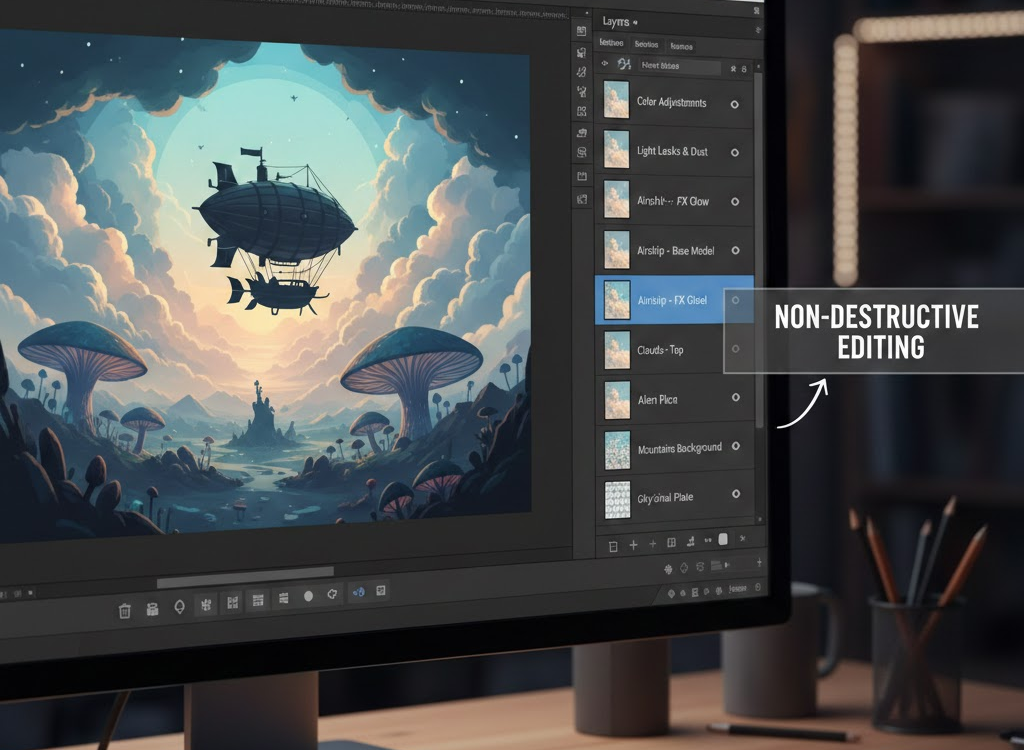
The option to deal with layers is one of the strongest possibilities in visual editing software. Layers can be used to edit a source image in such a way as to avoid the original being permanently changed, which is productivity and a non-destructive workflow.
Expert Opinion: Sarah Johnson, a digital artist, believes that there are no limits since one can work with layers. You are free to experiment and you know that you have not lost your initial image.
Best Practice: Make use of adjustment layers in color and effect changes. This is because it is easy to edit or delete them later without interfering with the base image.
3. Understanding Composition
In visual editing composition plays an important role. It means the way in which things are organized in the frame and can significantly affect what the overall effect of your work is. Such a technique like the Rule of Thirds can be used to make the images balanced and interesting.
Practical Tip: Stay in your editing software, and you can see the Rule of Thirds using guides. Put significant details of your image along them or their cross points to make it more interesting to look at.
Real-Life View: A portrait photographer may also make his or her subject slightly off-centre so that the eye of the viewer is naturally attracted to the subject.
4. Retouching Techniques
To improve the quality of photographs, especially portraits, retouching is necessary. This may include the process of eradicating flaws, correcting the complexions, and improving the features of the face without causing the picture to appear unnatural.
Practical Tip: Applications, such as the Healing Brush or Clone Stamp in Photoshop, can be used to get rid of any flaws. You should make sure to zoom in so as to make the necessary alterations and never attempt to remove the original texture of the skin.
Professional Opinion: Famous photographer John Smith highlights the fact that the secret of the success of retouching is discretion. Seek improvements, which preserve the authenticity of the subject.
5. Creative Compositing
Compositing is a process of mixing several images to create one and unified image. One may use this method to generate surreal images or to complement the narrative using visual arts.
Practical Hint: In composing, light and shadows play a significant role and should be taken care of to make sure that everything seems to be in place. Blend images using layer masks.
Real-Life Case Study: A graphic designer can make an advert with a picture of a product and a catchy background making sure the lighting of the product and the background are the same to give it a professional look.
6. The use of Filters and Effects
Images may be given a special touch by filters and effects. Although one should employ them sparingly, the appropriate filter can be used to uplift the mood and tone of the piece.
Practical Tip: Try various filters to discover their varying effects on the overall impression of your image. It can be considered the usage of such tools as Smart Filters in Photoshop to remain flexible.
Professional opinion: According to graphic designer Emily Davis, it is possible to express emotions with the use of filters. A soft focus filter (such as) can be used to give a dreamy effect, and can be used with high contrast to be dramatic.
7. Integration of text and Typography
Texting along with your graphics can add to your message and make your work more interesting. A skill in typography is a crucial part of visual editing because it can greatly affect the impression of your piece of art on the viewer.
Practical Tip: Select the fonts that will go well with the design and make the text readable on a background. Test font and spacing to get the correct balance.
Real-Life Case: The artist who is promoting a gallery exhibition may have a fancy type over a bright background, whereby the text of the postage attracts attention and the text does not interfere with the entire composition.
8. Understanding File Formats
The correct file format is a vital element that should be used in visual editing. A variety of formats can be utilized with different purposes, be it the purpose of a web, printing or archiving. Knowing these differences will allow you to be a quality and compatible match.
Practical Tip: JPEG can be used on web images because it is a lower file size whereas TIFF or PNG are more applicable in print-based projects that demand a better quality image.
9. Staying Updated on Trends
The sphere of visual editing is ever-changing and there are new methods and tendencies emerging every day. Staying in the game and keeping up with what is going on in the industry can make you relevant and inspired.
Professional opinion: Digital artist Mike Thompson suggests such tips as guidance in social media industry leaders, workshops, and involvement in online communities to get ahead of the curve.
10. Practice, Practice, Practice
Lastly, practice is the most essential method of visual editing mastership. The editing you do the more you will develop your style and knowledge of the various techniques.
Actionable Advice: Give yourself some time each week where you explore new editing skills or reexamine your older work with new eyes.
Conclusion
Any future digital artist should master the practices of visual editing. With these basic knowledge and skills (color correction, layering, composition, retouching and more) you can take your art work to a higher level and make some powerful images that will appeal to your viewers. Constant practice and readiness to experiment will eventually result in development and improvement of your artistic path.
FAQs
Q1: What is visual editing?
A: Visual editing is a process of altering images or graphics in order to make them look better or communicate a particular message through editing the image, such as by use of color adjustments, retouching and composing.
Q2: What are the reasons as to why layers are important in visual editing?
A: Layers permit non-destructive editing, as the artists do not have to change the original image permanently and instead can manipulate it to be more flexible and creative.
Q3: What can I do to improve my visual editing skills?
A: Train, try various techniques, watch the trends of the industry, and ask other artists to comment on your work and help improve your skills and create your own style.